This document covers the temperature-related operating guidelines for LUCID’s ASX053S-WC and ASX033S-WC Atlas10 SWIR cameras. These guidelines are intended to help users configure the built-in thermoelectric cooling device and use the external heat sink.
Thermoelectric cooling (TEC)
The ASX053S and ASX033S feature thermoelectric cooling (TEC) for reduced noise and improved image quality. The following camera nodes help you configure the TEC cooling setpoints:
| Grouping | Node name | Unit | Description |
|---|---|---|---|
| TECControl | TECEnable | N/A | Enable TEC. |
| TECControl | TECControlTemperatureSetPoint | Degrees Celsius | Configure the setpoint. |
Turning off TEC has the advantage of reducing power consumption.
Temperature limits
| Setpoint | Max. case temperature |
|---|---|
| 20°C (default setting) | 55°C |
| 15°C | 50°C |
| 10°C | 45°C |
The results above were obtained with a 16 mm Tamron SWIR lens (TSMA160) mounted to the camera.
Temperature information available from the camera nodes
The following information is available from the camera nodes in the TEC Control’s TECStatus node:
- Calibration: TEC temperature is not stable and has not reached the TEC set point range.
- Stable: Temperature is stable and has reached the TEC set point range.
- OutOfRange: Temperature was stable but is no longer within range of the TEC set point.
Case temperature
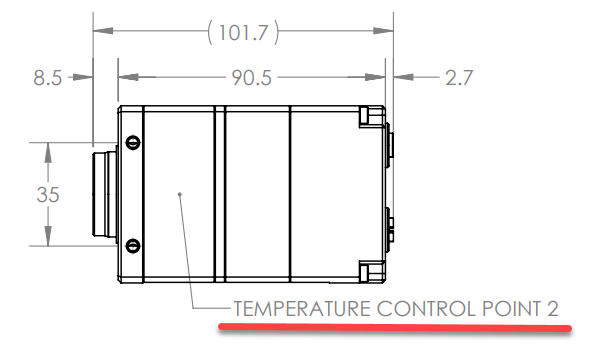
There are two temperature measurement points listed for the Atlas10 SWIR camera. Use Temperature Control Point 2 to determine the case temperature.
An optional external heatsink (HS-ASX-WC) is included free of charge with the camera and is shipped in a separate box. Installing this heatsink helps promote heat dissipation.
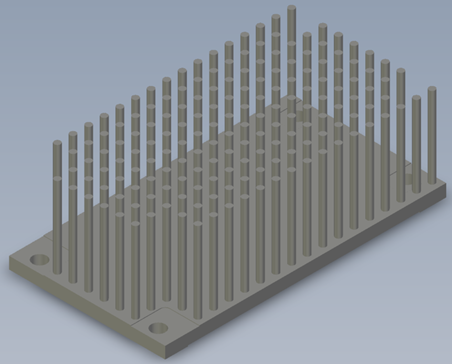
Attaching the heatsink
- Place the heatsink on the camera.
- Align it in the correct orientation (only one orientation is supported).
- Secure the heatsink using the four M4 screws provided.